
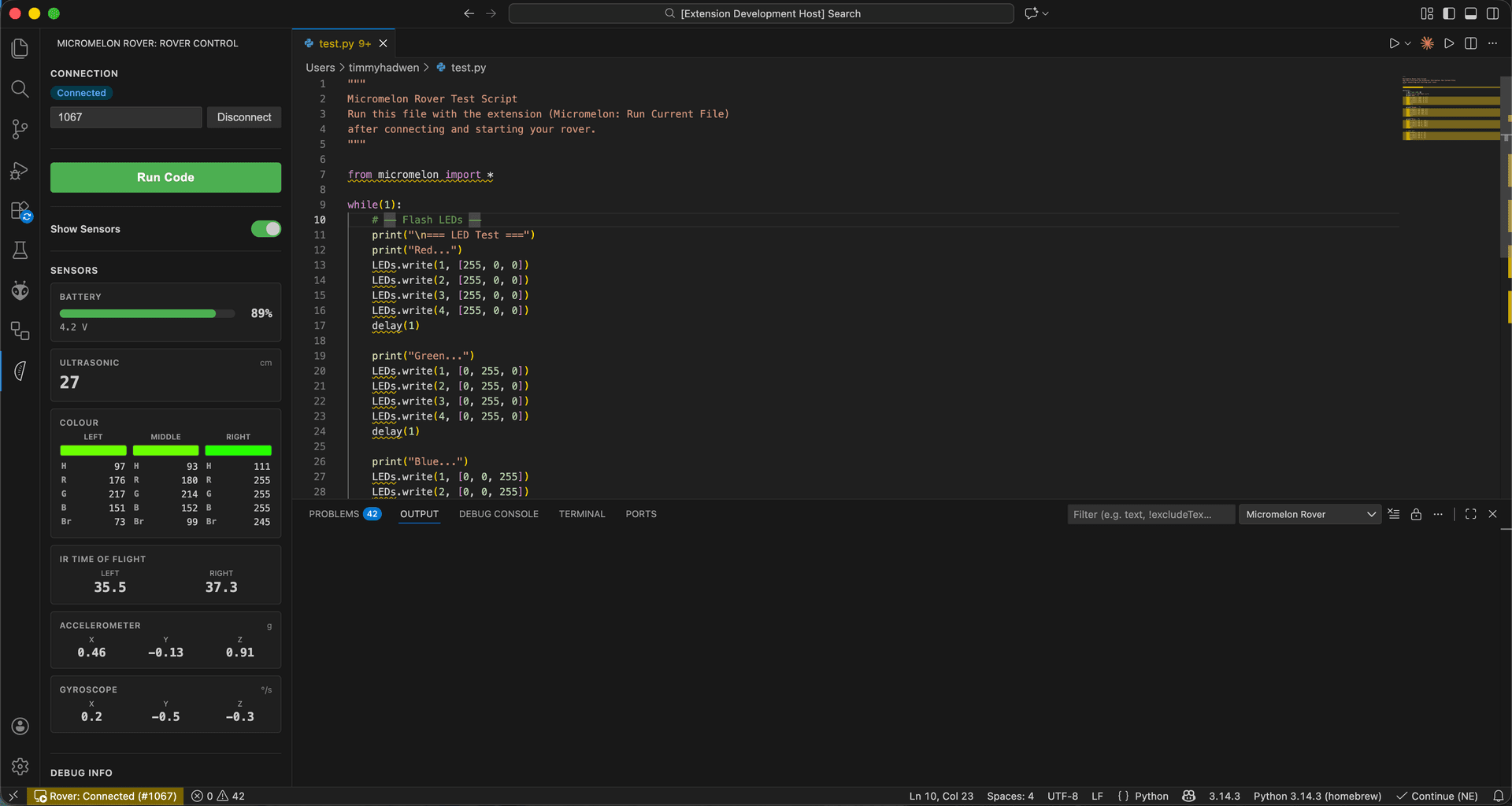
We're excited to announce the release of the Micromelon VS Code Extension — a free extension that brings full rover control into the world's most popular code editor.
Whether your students are ready to graduate from the Micromelon Code Editor or you're a developer looking to integrate rover control into a bigger project, the VS Code extension makes it easy to connect, code, and run — all from one place.
What It Does
The extension adds a dedicated Micromelon panel to VS Code's sidebar. From there, students can:
- Connect to any rover over Bluetooth Low Energy with a single click
- Run Python scripts on the rover instantly with F5
- View live sensor data — ultrasonic, colour, IR, accelerometer, and gyroscope — updated in real time
- Use built-in code snippets — type
mm-to access ready-made templates for motors, sensors, LEDs, and sounds
It works with both physical Micromelon Rovers and the Robot Simulator, so students can test and iterate without hardware.
Why VS Code?
VS Code is the most widely used code editor in the world, and it's free. Many schools already have it installed. By meeting students where they are, the extension removes friction and lets them focus on writing Python — not learning a new tool.
It's also the natural next step in the Micromelon learning pathway. Students who started with simplified blocks in Junior, progressed through the Code Editor's block and text modes, and are now ready for a professional development environment can make the jump without losing access to their rover.
Getting Started
- Install VS Code (free)
- Search for Micromelon in the Extensions marketplace and install
- Install the Python library:
pip install micromelon - Click the Micromelon icon in the sidebar and connect to your rover
- Write your first script and hit F5
That's it — students can go from install to running code on a real robot in minutes.
Built-In Code Snippets
The extension includes snippets for common tasks so students don't have to memorise the API. Type mm- and VS Code will suggest completions like:
mm-connect— Connect to a rover by IDmm-motors— Drive forward, backward, and turnmm-sensors— Read ultrasonic, colour, and IR sensorsmm-leds— Set LED coloursmm-sounds— Play notes and melodies
Each snippet includes comments explaining what the code does, making them useful as learning tools as well as shortcuts.
Works With the Simulator
Don't have a physical rover handy? The extension connects to the Micromelon Robot Simulator just as easily. Students can develop and test their code in the simulator, then deploy the exact same script to a real rover when they're ready.
Download
The Micromelon VS Code Extension is available now for free on the VS Code Marketplace. It works on Windows and macOS.
Ready to try it? Head to the Python page to learn more, or download everything you need to get started.